Jenni.ai
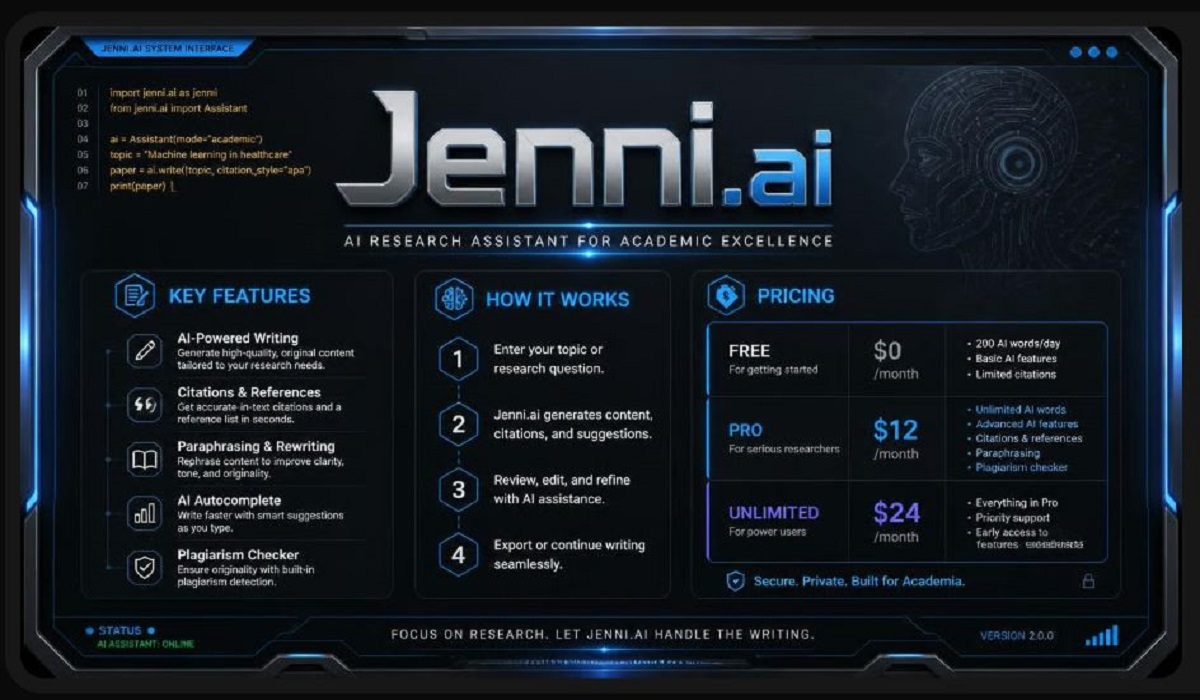
Jenni.ai: This blog post provides a comprehensive review of Jenni.ai: Key Features, Pricing, and Other Options – Latest 2026. We will explore how this tool helps with AI autocomplete, in-text citations, and PDF research. We will also look at its pricing plans, from the free version to the unlimited subscription, and discuss the best alternatives available today. Whether you are writing an essay, thesis, or research paper, this guide will help you decide if Jenni.ai is the right writing partner for your academic journey.
What is Jenni.ai?
In the fast-paced world of academia, writing a research paper often feels like an uphill battle. Students and researchers spend countless hours formatting citations, worrying about grammar, and trying to overcome writer’s block. Jenni.ai enters the scene as a game-changer. It is not just another word processor; it is an academic writing assistant that uses artificial intelligence to help you write better and faster.
But what makes Jenni.ai so special in 2026? Unlike generic AI tools that just create random content, Jenni is built with a specific purpose: to help with academic integrity and rigorous research. It combines an AI-powered autocomplete function, which helps you finish your sentences in a scholarly tone, with a powerful citation tool that supports over 2,600 styles . It also features a document library where you can upload PDFs and ask the AI questions about them .
Since its founding by David Park, a former literature student, the tool has undergone a massive evolution . Initially built for marketers, it pivoted strictly to the academic market after finding a loyal audience in students and researchers. Today, it is a $10 million business with a small but dedicated team, proving that niche tools often work better than generic ones . Let’s dive deep into the Jenni.ai: Key Features, Pricing, and Other Options – Latest 2026 to see if it’s the right fit for your workflow.
The Core Features of Jenni.ai
1. AI Autocomplete: Beating the Blank Page
The most talked-about feature of Jenni.ai is its AI Autocomplete. This is often the first thing people try, and it is powerful. As you start typing a sentence, Jenni suggests how to continue it. This is not just random text generation; it is contextual. The tool understands the academic register and tries to keep your tone consistent .
For a student writing an essay, this can be a lifesaver. It helps push through those moments of writer’s block where you don’t know what to say next. You can write a few words, hit the “Tab” key or a shortcut, and watch Jenni finish the thought . However, it’s important to remember that the AI is a tool, not a replacement for your brain. Reviews in 2026 note that if you let it generate too much text, the quality can become “generic or shallow” . It works best in short bursts to keep your momentum going, rather than asking it to write entire paragraphs for you from scratch.
2. Citation Generation: The Academic Backbone
This is arguably where Jenni.ai shines the brightest and justifies its existence. One of the most tedious parts of research is getting citations right. Jenni.ai integrates a smart citation tool directly into its editor. You don’t have to leave your document to format your references. It supports a massive library of over 2,600 citation styles, including all the big ones like APA, MLA, Chicago, and Harvard .
The workflow is impressive. If you have a PDF uploaded in your library, you can insert a citation from that document directly into your text. It also allows you to search for sources using a DOI or PMID . However, the tool is not perfect; experts strongly recommend manually checking every reference before submitting a paper because the AI can occasionally misattribute quotes or create metadata errors .
3. The PDF Library and Research Assistant
This is a huge feature for anyone doing a literature review. Jenni.ai allows you to upload PDFs (up to 150 pages and 15MB per file) into a centralized library . Once uploaded, you can interact with them.
This feature integrates “Chat with PDF” capabilities. You can ask questions like, “What is the main argument of this paper?” or “What methodology did the author use?” and Jenni provides answers based on the source . This allows you to quickly scan through multiple papers without reading every word, making it easier to organize your research. It also helps you pull exact quotes and summaries, making the drafting phase much faster.
4. Document Review and AI Commands
In late 2025 and early 2026, Jenni rolled out a significant feature: Document Review . This is like having a fast colleague read your entire paper.
The review feature doesn’t just check grammar. It analyzes your manuscript for clarity, repetition, and style inconsistency . It can flag paragraphs that sound repetitive or areas where the tone drifts away from formal academic writing. Furthermore, it offers AI editing commands that let you highlight a sentence and ask the AI to “simplify,” “paraphrase,” or “fix grammar” . This feature is excellent for polishing your work before submission.
Jenni.ai Pricing Plans in 2026
Understanding the pricing of Jenni.ai: Key Features, Pricing, and Other Options – Latest 2026 is crucial for students on a budget. As of 2026, Jenni.ai maintains a simple pricing structure, generally moving from a free tier to a subscription model.
Here is the breakdown based on the latest information:
1. The Free Plan
The Free Plan is meant as an introduction, not a full solution. It offers a limited “playground” to test the waters.
- Best for: Casual writers who want to try the autocomplete and see the citation engine.
- Cost: $0
- Features:
- Limitation: The 200-word limit is severe. You might burn through this limit in just a few paragraphs, which means the free version is not suitable for serious writing projects .
2. The Unlimited Plan
This is the flagship plan and where Jenni becomes a serious tool.
- Best for: PhD students, researchers, and professionals writing long-form academic content.
- Cost: Generally listed at $30 per month, but this drops significantly if you pay annually (approx. $12 per month) .
- Features:
- Value: This is the only plan that makes practical sense for graduate students. You don’t need to worry about running out of words mid-thought.
3. Team and Institutional Plans
For universities, research labs, or groups.
- Best for: Departments or organizations needing centralized billing.
- Cost: Custom pricing.
- Features: Includes all unlimited features but adds centralized billing, usage analytics, and dedicated support .
Pros and Cons of Using Jenni.ai
What Works Well:
- The Workflow: Jenni is excellent at keeping you in the “flow state.” You can read a PDF, ask questions, and write citations all in one tab .
- Citation Management: It truly simplifies what is usually a nightmare for students. It is one of the best for citation formatting .
- Targeted Tool: Because it’s made for academics, it speaks the right language. It avoids the marketing-speak of general AI tools .
Where it Falls Short:
- The Output Quality: You can’t just let it write for you. The AI output often lacks deep substance, and depending on it too much can make your paper sound repetitive or vague .
- High Price Point: Compared to general tools like ChatGPT or even Grammarly Premium, the monthly cost is high if you are only a light user .
- Citation Accuracy: Remember, you must double-check every citation. The AI can make mistakes, and a wrong citation can ruin a grade or a career .
- Plagiarism Checker: As of 2026, reviews note that Jenni does not include a built-in plagiarism checker, which is a significant drawback for students who need to verify their work’s originality .
Other Options: The Best Jenni.ai Alternatives in 2026
No single tool fits everyone’s needs. Depending on your budget and what you are writing, you might prefer one of these alternatives to Jenni.ai.
1. Paperpal
Best for: Strict academic editing and journal submissions.
Paperpal is a heavy hitter in the academic space. Integrates deeply with Microsoft Word and is often recommended for its context-sensitive suggestions and plagiarism detection . It is ideal if you are submitting to a specific journal and need strict grammar and style adherence. It tends to be more rigorous than Jenni but offers less flexibility in creative drafting .
2. SciSpace
Best for: Literature reviews and PDF research.
SciSpace (formerly Typeset.io) is a direct competitor. It focuses heavily on discovering papers, explaining mathematical notation, and helping with reading comprehension . While Jenni is a writing tool, SciSpace is a research tool that also writes. If you spend a lot of time simply trying to read and understand complex research before writing, SciSpace might be the better fit. It also has strong support for LaTeX .
3. Grammarly
Best for: General grammar and tone corrections.
While not specifically an “academic writing tool” like Jenni, Grammarly is a staple for a reason. It offers a free plan (with a premium upgrade) that catches grammar, spelling, and punctuation errors across the web and in apps. While Jenni helps you write the content, Grammarly helps you polish it . It is generally cheaper than Jenni.
4. ChatGPT (General AI)
Best for: Quick idea generation and brainstorming.
OpenAI’s ChatGPT is versatile. While it lacks the citation management and research library of Jenni.ai, it is incredibly cheap or free. It’s useful for brainstorming outlines or summarizing concepts, but it is often banned from academic work due to the risk of hallucinations and the lack of accountability for citations.
5. Fabric
Best for: Storing and understanding research.
Fabric is more of an “AI workspace” than a writing tool. It stores your research files and allows you to query them. Jenni is a “writing tool”; Fabric is a “thinking tool” . You could easily use both: Fabric to understand your research, and Jenni to write the final paper.
Who Should Use Jenni.ai in 2026?
Based on the Jenni.ai: Key Features, Pricing, and Other Options – Latest 2026 analysis, here is who benefits the most:
- Graduate Students and PhD Candidates: If you are writing a thesis or a dissertation, the “Unlimited” plan offers the best workflow. The ability to manage PDFs and insert citations seamlessly saves hundreds of hours .
- Researchers: If you are writing literature reviews or journal articles that require strict formatting and tons of references, Jenni is a powerful partner.
- ESL (English as a Second Language) Students: The AI is excellent at correcting grammar and suggesting word choices appropriate for formal English. It helps non-native speakers write with more confidence and a more academic tone .
However, if you are a marketer or write blog posts, you should look elsewhere. The tool is too specialized for general content creation and is more expensive than your average generalist AI writer.
Summary
Jenni.ai has carved a unique niche for itself as a top-tier academic writing assistant. It stands out in the crowded field of AI tools because it focuses specifically on the pain points of researchers: starting the draft (AI Autocomplete), managing sources (PDF library), and handling tedious formatting (Citation Generator). However, it is a tool that requires user responsibility. The AI writing assistance is helpful for ideas and sentences, but it cannot think for you, and you must diligently check every fact and citation.
The pricing is clear and reasonable for serious students but maybe steep for casual users. There are great alternatives like Paperpal and SciSpace, which offer similar but different features. In the end, if you choose Jenni.ai, you are not just buying an AI generator—you are buying a structured workflow.
Frequently Asked Questions (FAQs)
1. Is Jenni.ai considered cheating for academic writing?
Using Jenni.ai is not considered cheating as long as you use it responsibly as a writing assistant rather than a substitute for your own work. It is meant to help with editing, formatting citations, and overcoming writer’s block. You must ensure that the final intellectual contribution, analysis, and writing are your own. As noted in academic guides, responsible use of these tools is becoming more common in professional settings .
2. Does Jenni.ai have a plagiarism checker?
According to reviews, as of 2026, Jenni.ai does not have a built-in, native plagiarism checker . If you need to check your work for plagiarism, you will need to use a separate tool like Turnitin, Grammarly (Premium), or another external checker.
3. What is the difference between Jenni.ai and Grammarly?
Jenni.ai is a research and academic drafting tool that helps you write paragraphs, manage citations, and interview PDFs. Grammarly is primarily a grammar and style checker. They are complementary: you could use Jenni to structure and research, then use Grammarly to do a final polish on the grammar and tone .
4. Is the Jenni.ai free plan good enough?
For most people writing long academic papers, the Free Plan is not sufficient. It limits you to 200 AI-generated words per day, which is about one paragraph. The free plan is best used as a “trial” to see how the tool works before upgrading to the Unlimited plan for real writing .
5. Can Jenni.ai write an entire research paper for me?
Technically, it can generate text, but you should not let it write an entire paper. The AI-generated text often lacks deep insight and logical flow and can become repetitive. It is designed to be an “accelerator,” not a shortcut. You need to be an expert in your subject to guide the tool and verify its output. You cannot “set it and forget it”