Best Free Educational Apps for Kids
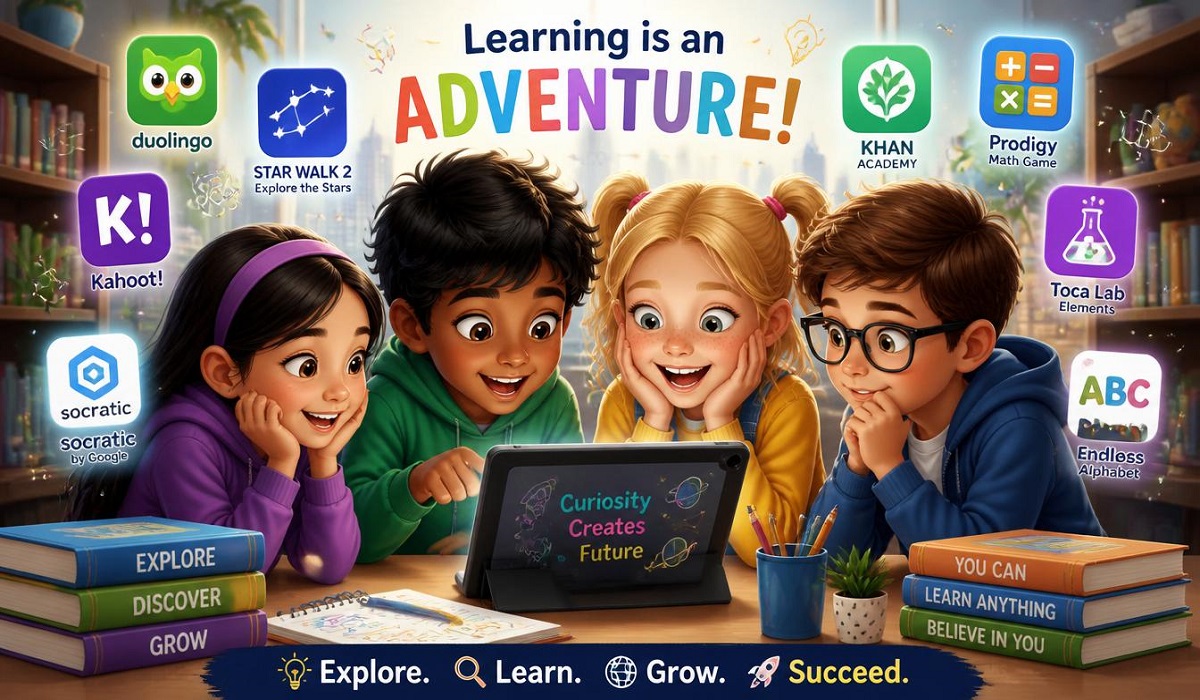
Best Free Educational Apps for Kids: Let’s be real. Screen time is a part of modern childhood. Instead of fighting it, why not make it count? As a parent or teacher, finding the best free educational apps for kids with examples of what makes them great can feel like a full-time job. The app stores are overflowing with options, and many of them promise the world but deliver flashy games with little actual learning.
This guide cuts through the noise. We have looked at the latest and greatest apps in 2026 to bring you a list that is not only free but also genuinely helps children learn. We have focused on apps that are safe, contain no annoying ads, and have been proven to work by educators and parents like you. Whether you have a toddler just learning their ABCs or a second-grader needing a math boost, there is something here for everyone.
Our Top Pick for Overall Learning
1. Khan Academy Kids
If you only download one app from this list, make it this one. Khan Academy Kids is the gold standard for early childhood education. It is 100% free, has no ads, and offers a massive library of over 5,000 activities for children ages 2 to 8 .
What makes it special?
This app isn’t just about drill and kill. It covers the full spectrum of early learning: reading, math, writing, social-emotional development, and even executive functioning skills like memory and focus . The app features adorable characters like Kodi the Bear and Reya the Red Panda who guide kids through the activities .
Example in Action:
Imagine your child is learning phonics. They don’t just see letters on a screen. They play games where they match letters to sounds, trace them with their fingers, and listen to stories that emphasize the sounds. The app adjusts to their level, so if they are breezing through number recognition, it introduces basic addition. If they are struggling with a concept, it provides more practice. It even has a library of hundreds of books, including non-fiction from National Geographic .
Key Features:
- Personalized Learning: The path adjusts to your child’s pace .
- Offline Access: Perfect for road trips or waiting rooms .
- Teacher Tools: Great for homeschooling or classroom use, allowing teachers to assign specific lessons .
- Ages: 2–8
Best Apps for Early Readers
2. Duolingo ABC
From the makers of the famous language-learning app, Duolingo ABC brings the same step-by-step, structured approach to teaching reading . It is designed for children ages 3 to 7.
What makes it special?
Duolingo ABC focuses on building foundational literacy skills in a logical order. Kids learn letter recognition, phonics, and sight words through mini-games that involve tapping, tracing, and listening .
Example in Action:
Instead of just showing the letter “A,” the app asks the child to trace the letter with their finger, then listen to the sound “a” in a word like “apple,” and finally drag the letter to complete a simple word. It uses a sequential learning path, so children don’t get ahead of themselves before they’ve mastered a skill .
Key Features:
- Structured Learning Path: A clear, linear progression that builds confidence .
- Speech Recognition: Encourages kids to say sounds and words out loud .
- Completely Free: No ads, no in-app purchases.
- Ages: 3–7
3. Endless Alphabet
This app turns learning vocabulary and phonics into a hilarious, sensory-rich experience . It is aimed at children ages 2 to 7 and features adorable animated monsters that act out words.
What makes it special?
Endless Alphabet uses a one-time purchase model (currently $8.99), but it is often cited alongside free apps for its exceptional quality . However, if you are looking for the best free educational apps for kids with examples of vocabulary building, many schools offer access to this or similar apps. The magic here is the sheer engagement; kids don’t even realize they are learning.
Example in Action:
The app presents a word like “GARGANTUAN.” The child must drag the correct letters into the empty spaces. Once the word is spelled, a cute, goofy monster animation acts out the word’s meaning in a way that is unforgettable. The exaggerated scenes and silly sound effects make learning vocabulary a joy .
Key Features:
- Engaging Animations: Makes abstract concepts concrete and memorable.
- Strong Phonics Focus: Aids in letter recognition and spelling.
- Offline Play: No internet needed once downloaded .
- Ages: 2–7
Best Apps for Math
4. Moose Math (by Khan Academy)
Now part of the Khan Academy family, Moose Math is a delightful introduction to mathematics for children ages 3 to 7 . It turns math into an adventure where kids solve problems to build a town.
What makes it special?
Moose Math focuses on concrete early math skills: counting, addition, subtraction, shapes, and sorting. The story-driven format helps young learners understand why math matters in a fun, low-pressure context .
Example in Action:
Your child is playing in a carnival and needs to help a character by counting the number of balls in a game, or they are sorting fruit in a market. They complete the task, earn a reward, and use it to build a new building in their city. This connection between completing a task and seeing a result is highly motivating for young children .
Key Features:
- Adventure-Based: Math problems are disguised as fun activities.
- Completely Free: No ads or in-app purchases.
- Offline Capable: Great for learning on the go.
- Ages: 3–7
5. Bedtime Math
This app is a little different from the others, and that is what makes it so special. Bedtime Math is designed to be a daily ritual, like a bedtime story, but with numbers . It is aimed at families with children ages 3 to 9 who want to combat math anxiety.
What makes it special?
Instead of focusing on rote learning, Bedtime Math offers interesting, real-world facts followed by word problems at three difficulty levels. The goal is to make math a normal, enjoyable part of everyday life .
Example in Action:
The app tells a story: “A sloth can hold its breath underwater for 40 minutes. How many naps could you take in that time?” It then presents a problem for “Wee Ones” (counting), “Little Kids” (simple addition), and “Big Kids” (multiplication). It’s designed for parents and children to solve together .
Key Features:
- Parent-Child Interaction: Encourages bonding over learning.
- Reduces Math Anxiety: Makes numbers fun and low-stakes.
- Daily Content: A new fun fact every day.
- Ages: 3–9
Best Apps for Creative Thinking & Coding
6. ScratchJr
Created by MIT in collaboration with PBS Kids, ScratchJr is the best and gentlest introduction to coding for young children ages 5 to 7 . It requires no reading, making it accessible to even pre-readers.
What makes it special?
Kids learn real computational thinking concepts like sequencing, loops, and triggers by snapping together colorful blocks of code. They don’t just learn to code, they code to learn as they create their own animated stories and games .
Example in Action:
A child wants to make a character jump up and down. They snap a “move up” block and a “move down” block together. Then they add a “tap” block to the top of the stack so the character jumps only when they tap it. They are “programming” without even realizing it. This open-ended creative design is where ScratchJr shines .
Key Features:
- Open-Ended Play: Kids create their own stories, not just follow a script.
- No Ads and Safe: No personal information is collected .
- Real Coding Concepts: Introduces important skills like problem-solving.
- Ages: 5–7 (with adult guidance for younger)
7. Noia Kids
If you are looking for a low-stimulation, Montessori-inspired app, Noia Kids is a fantastic new option. It is a free app for children ages 4+ that focuses on calm, focused learning .
What makes it special?
Noia Kids is designed to feel more like real life than a flashy video game. There are no loud sounds, no ads, and no manipulative reward loops. It includes activities for math, literacy, coloring, and puzzles that are self-paced and pressure-free .
Example in Action:
Instead of a counting game with explosions and music, a child might practice counting by matching numbers to a set of objects. They might do a word search or trace letters in a simple, uncluttered interface. It’s a great choice for kids who get overstimulated by other apps .
Key Features:
- Low-Stimulation: Quiet and focused, ideal for sensory-sensitive kids.
- Montessori-Inspired: Encourages self-paced, hands-on learning.
- Offline-First: Works perfectly without Wi-Fi after content is downloaded .
- Ages: 4+
Best for Science & Familiar Characters
8. PBS Kids Games
PBS has been a trusted name in children’s media for decades, and their app, PBS Kids Games, lives up to that reputation . This app is a staple in the category of best free educational apps for kids with examples of trusted, curriculum-based entertainment. It is aimed at ages 2 to 8.
What makes it special?
The app features beloved characters from shows like Daniel Tiger’s Neighborhood, Curious George, and Wild Kratts. This makes the learning content feel immediately familiar and engaging for kids. It covers a wide range of subjects, including math, literacy, science, and problem-solving .
Example in Action:
A child who loves Curious George can play a game where they help him count bananas. A fan of Wild Kratts can learn about animal habitats. The variety is immense, and the quality is consistently high because the content is developed with early childhood education experts .
Key Features:
- Trusted Characters: Kids love to learn with their favorite friends.
- Curriculum-Based: Covers multiple subjects.
- Completely Free: No ads directed at children.
- Ages: 2–8
Best All-in-One Curriculum App
9. ANTON
ANTON is a powerhouse of a learning app for kids ages 4 to 14. It is an all-in-one curriculum that covers everything from English and math to science and history .
What makes it special?
ANTON is completely free, with no ads and no daily playing limits. It’s one of the few apps that stays free for students all the way through middle school, making it a great tool as your child grows . It is also aligned to state standards and is used by schools around the world.
Example in Action:
Your child can use ANTON to practice early literacy by listening to sounds and dragging letters, and then switch to a math game to practice multiplication. The app has over 100,000 exercises and 200 different interactive exercise types, so the learning never gets boring . It even includes tools for kids with dyslexia, dyscalculia, and ADHD .
Key Features:
- Wide Age Range: Grows with your child from preschool to middle school .
- Multiple Subjects: Covers English, math, science, history, languages, and more.
- Teacher and Parent Tools: Allows for progress tracking and class management .
- Ages: 4–14
10. Giggle Academy
A new and interesting option on the market, Giggle Academy is a free, AI-powered learning app for kids ages 2 to 8 . Its main focus is on getting kids to speak and build literacy skills, and it boasts an impressive 95% speaking participation rate.
What makes it special?
Giggle Academy uses AI to guide animated lessons and incorporate speech recognition, which is a unique feature for an early learning app . It also includes gamified activities for math, creativity, and social-emotional learning.
Example in Action:
The app doesn’t just ask your child to tap a letter; it asks them to say it. The AI listens and provides feedback, encouraging them to speak out loud. This is a brilliant way to build confidence in verbal skills and language learning .
Key Features:
- AI-Driven Speech: Gets kids talking and practicing language.
- Personalized Learning: The adaptive path adjusts to the child’s pace.
- Completely Free: No ads, no in-app purchases.
- Ages: 2–8
How to Choose the Right App?
With so many options, how do you choose the best free educational apps for kids with examples that fit your child’s needs? Here is a quick guide:
- Consider Your Child’s Age: Apps are designed for specific developmental stages. Make sure to check the recommended age range.
- Identify Their Interests: Does your child love animals? Look for apps like PBS Kids Games that feature animal characters. Are they a natural builder? Try a creative app like ScratchJr.
- Check for Ads and In-App Purchases: The apps on this list prioritize being completely free and safe, but always double-check the app store description. Look for phrases like “100% Free” and “No Ads.”
- Look for Offline Access: If you plan to use the app on road trips or in places with poor internet, this is a crucial feature.
- Try Them Together: The best way to see if an app is a good fit is to explore it with your child. See if it captures their attention and if the learning content is clear and appropriate.
FAQs
1. Are these apps really free?
Yes, all the apps mentioned in this article are completely free to download and use. Khan Academy Kids, Duolingo ABC, PBS Kids Games, and ANTON are entirely free with no ads or in-app purchases. Some apps like Endless Alphabet have a one-time cost for the full version, but many schools and libraries offer access. We have focused on truly free options.
2. Are these apps safe for my child?
Absolutely. Safety is a top concern for parents. All the apps listed prioritize child safety. They are COPPA-compliant, contain no third-party ads, and have no external links that could lead a child to inappropriate content . They are created by trusted organizations like Khan Academy, MIT, and PBS.
3. What is the best app for a child just starting kindergarten?
For a child starting kindergarten, Khan Academy Kids is an excellent all-around choice. It covers everything they will learn in kindergarten, from phonics to early math, in a fun, engaging way. For a more focused approach on reading, Duolingo ABC is fantastic.
4. My child is 10 years old. Are there any free options for them?
Yes! While many of the apps on this list are for younger kids, ANTON is perfect for kids up to age 14. It covers middle school subjects like science and history. Khan Academy Kids is specifically for ages 2-8, but Khan Academy’s main platform has free courses for all ages.
5. How much screen time is healthy for kids using these apps?
Experts generally recommend limiting screen time, but high-quality educational apps are a great way to use screen time positively. A good rule of thumb is to use these apps in short, focused bursts. For young children, 15-30 minutes a day is often plenty. The key is to be present and engage with your child, asking them questions about what they are learning.
Summary
Finding the best free educational apps for kids with examples of real value is easier when you know where to look. This 2026 list provides a fantastic starting point for parents and educators who want to make screen time meaningful.
From the comprehensive curriculum of Khan Academy Kids to the focused reading lessons of Duolingo ABC and the creative coding of ScratchJr, these apps prove that you don’t have to spend a fortune to give your child a high-quality education. They are safe, they are fun, and they are completely free.
So, why not start exploring? Download a couple of these apps today, and watch your child’s eyes light up as they learn, play, and grow.